

Rules
Overview
Section titled “Overview”A rule says where one of your Subjects may play in the edit: never two of its shots in a row, only after the drop, on the last shot, and so on. Rules hold through every Re-Roll. Each time Onset picks clips for the timeline, it checks every rule before it puts a clip in a shot, so a rule holds whatever the style or the music would otherwise choose.
A rule always names a Subject you taught, such as your dog Rex or a friend. It can’t name a word to search for, or a shot type such as close-ups. If you haven’t taught the Subject yet, do that first: select a few shots of it on the timeline and press Teach (see Subjects).
Rules are for Cut a montage. Use my photos and clips shows each item once, in order, and Year in review shows one moment a day or a week, in date order, so neither uses rules: Rules… says so if you open it there.
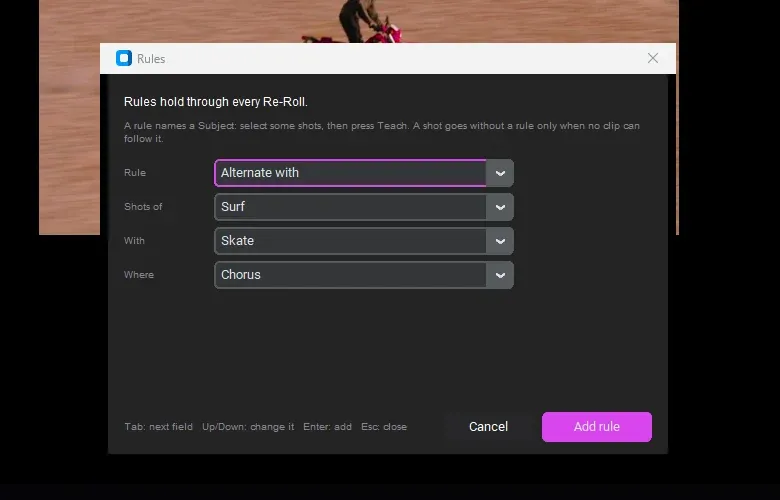
Opening the Rules window
Section titled “Opening the Rules window”| How | For the whole video | For one part of the song |
|---|---|---|
| Menu | Edit > Rules… | |
| Settings | Rules… next to Pacing (under All settings) | |
| Direction | + Add direction > A rule… | Click the part’s heading in Direction (Chorus), then A rule in the chorus… |
| Song’s parts | Right-click the part on the strip above the song, then A rule in the chorus… | |
| Keyboard | D, then A, then A rule… with the arrow keys and Enter | P until the part is chosen on the strip, then D, A, and A rule in the chorus… |
Opened for a part of the song, the window starts on a Never rule for that part. A stretch of time such as 0:30-1:00 has no A rule… in its menu: the window’s parts are the song’s named parts and before or after the drop.
Esc or Cancel closes the window without adding anything.
You can also say a rule in the command bar, without opening the window.
The window
Section titled “The window”Pick the kind of rule first: the window shows only the fields that rule needs.
- Rule: which kind of rule (see the next section).
- Shots of: the Subject the rule is about. The list holds every Subject in your library.
- With: the second Subject, for Alternate with.
- Where: the part of the song, for Only in part of the song, Alternate with and Never. It lists After the drop, Before the drop and the song’s own parts by name (Intro, Chorus…), plus The whole video for Never.
- Length: 1 bar, 2 bars or 4 bars, for No shot longer than.
The window works from the keyboard too. It opens with Rule ready, outlined in color. Tab goes to the next field (Shift+Tab back), Up and Down change the field you’re on, and typing a letter jumps to the next choice that starts with it (N goes to No shot longer than, then Never). Enter adds the rule.
Add rule adds it and closes the window. If the song hasn’t been analyzed yet, the window says Reading the song’s parts… and fills in Where a moment later.
If you have no Subjects yet, Add rule says Teach a Subject first: select some shots, then press Teach. Alternate with needs two different Subjects.
The six rules
Section titled “The six rules”| Rule | What it does to the edit | Its row in Direction |
|---|---|---|
| Never two in a row | No two shots of the Subject back to back. | Never two Rex shots in a row |
| Only in part of the song | The Subject plays only in that part, and nowhere else. | Rex only after the drop |
| End on | The edit’s last shot is the Subject, even if every clip of it has already played. | End on Rex |
| No shot longer than | A shot of the Subject ends on the next bar line at the latest (or the second or fourth, for 2 bars or 4 bars). | No shot of Rex longer than a bar |
| Alternate with | In that part, every shot is one Subject or the other, switching at each cut. | Alternate Rex and Max under Chorus |
| Never | The Subject stays out of the whole video, or of that part. | Never Rex, or Never Rex under Intro |
You can have several rules at once, and they all hold together.
When a rule changes the edit
Section titled “When a rule changes the edit”A rule added in the window changes the edit the next time Onset picks clips: the Re-cut button at the foot of the settings names Rules among what changed (✂ Re-cut: Rules changed). Click it (or press Ctrl+R), or click 🔄 RE-ROLL over the timeline. Either one keeps the shots you locked.
A rule said in the command bar re-cuts the timeline as soon as you apply it.
How a rule fits with everything else:
- Locked shots and must-use clips come first. A rule never moves a shot you locked or a clip a collection says must be used.
- A rule never shortens the edit. If no clip in your library can follow a rule for one shot, that shot goes without the rule, and the edit still runs to its full length.
- A rule comes before variety. With only a few clips of a Subject, a rule such as End on or Alternate with can show some of them twice.
- Your own edits come after the rules. A shot you drag, swap or re-roll on its own keeps what you chose, even when it breaks a rule.
Under Pacing in All settings, each rule has its own row. When some shots don’t follow a rule, the row says how many (⚠ 3), and hovering over it says why: the shots are locked, changed by hand, or no clip could follow it. 🔄 RE-ROLL tries again for the shots that aren’t locked.
If you delete a Subject that a rule names, the rule stays in Direction but does nothing until you teach that name again.
Rules in Direction
Section titled “Rules in Direction”Every rule shows as a row in Direction, in plain words:
- Never two in a row, Only in part of the song, End on and No shot longer than are listed under Whole video. Only in part of the song names its part in the row: Rex only after the drop.
- Never and Alternate with for one part of the song are listed under that part’s heading (Chorus, After the drop), so Never Rex under Intro keeps Rex out of the intro only. A Never for the whole video is under Whole video.
Clicking a rule’s words opens the Rules window. Renaming a part of the song on the strip takes its rules along (see The song’s parts).
Taking a rule away
Section titled “Taking a rule away”| Mouse | Keyboard | Command bar |
|---|---|---|
| ✕ at the right of its row in Direction, or click its row under Pacing | D, the arrow keys to the row, then Delete | forget the no Rex rule |
Adding or taking away a rule is one undo step: Ctrl+Z puts it back as it was. As with adding one, taking a rule away from Direction or the settings changes the edit at the next Re-cut or Re-Roll; from the command bar, at once.
In the command bar
Section titled “In the command bar”Say the rule with your Subject’s name, and the bar shows what it understood before anything changes:
- never two of Rex in a row
- end on Rex
- no Rex in the intro ever again
For a Never rule, the lasting words matter. With “ever again”, the sentence makes a rule that holds through every Re-Roll. Without them, the bar keeps the Subject out of those shots this once, and the next Re-Roll is free to bring it back.
If the bar doesn’t know the name yet, it says so and asks you to teach it first. A shot type such as close-ups can’t be the subject of a rule: teach a Subject from shots of what you mean instead.
Rules from a sentence and from the window are the same: they show the same row in Direction and are taken away the same way.